Instructions
Find easy to follow instructions
SVG filter
The svg filter effects in this template are summarized in this page.
<!-- SVG FILTER FOR OUR TEAM CARD -->
<svg width="0" height="0" xmlns="http://www.w3.org/2000/svg">
  <filter id="cyberGlitchTeam">
    <!-- 1️⃣ Noise pattern -->
    <feTurbulence type="fractalNoise"
      baseFrequency="0.02 0.8"
      numOctaves="1"
      seed="3"
      result="noise">
      <animate id="turbAnimTeam"
        attributeName="baseFrequency"
        dur="1.8s"
        values="0.02 0.8; 0.005 0.45; 0 0"
        keyTimes="0;0.7;1"
        fill="freeze"
        begin="indefinite"/>
    </feTurbulence>

    <!-- 2️⃣ Displacement -->
    <feDisplacementMap in="SourceGraphic" in2="noise"
      scale="60"
      xChannelSelector="R"
      yChannelSelector="G"
      result="displaced">
      <animate id="dispAnimTeam"
        attributeName="scale"
        dur="1.8s"
        values="60;30;10;0"
        keyTimes="0;0.4;0.8;1"
        fill="freeze"
        begin="indefinite"/>
    </feDisplacementMap>

    <!-- 3️⃣ Subtle flicker brightness -->
    <feComponentTransfer in="displaced" result="final">
      <feFuncR type="linear">
        <animate id="flickerRTeam"
          attributeName="slope"
          dur="1.8s"
          values="1.1;1;1"
          keyTimes="0;0.4;1"
          fill="freeze"
          begin="indefinite"/>
      </feFuncR>
      <feFuncG type="linear">
        <animate id="flickerGTeam"
          attributeName="slope"
          dur="1.8s"
          values="1.1;1;1"
          keyTimes="0;0.4;1"
          fill="freeze"
          begin="indefinite"/>
      </feFuncG>
      <feFuncB type="linear">
        <animate id="flickerBTeam"
          attributeName="slope"
          dur="1.8s"
          values="1.1;1;1"
          keyTimes="0;0.4;1"
          fill="freeze"
          begin="indefinite"/>
      </feFuncB>
    </feComponentTransfer>
  </filter>
</svg>

<!-- SVG FILTER FOR ABOUT US IMAGE -->
<svg width="0" height="0" xmlns="http://www.w3.org/2000/svg">
  <filter id="cyberGlitch">
    <!-- 1️⃣ Noise pattern -->
    <feTurbulence type="fractalNoise"
      baseFrequency="0.02 0.8"
      numOctaves="1"
      seed="3"
      result="noise">
      <animate id="turbAnim"
        attributeName="baseFrequency"
        dur="1.8s"
        values="0.02 0.8; 0.005 0.45; 0 0"
        keyTimes="0;0.7;1"
        fill="freeze"
        begin="indefinite"/>
    </feTurbulence>

    <!-- 2️⃣ Displacement -->
    <feDisplacementMap in="SourceGraphic" in2="noise"
      scale="60"
      xChannelSelector="R"
      yChannelSelector="G"
      result="displaced">
      <animate id="dispAnim"
        attributeName="scale"
        dur="1.8s"
        values="60;30;10;0"
        keyTimes="0;0.4;0.8;1"
        fill="freeze"
        begin="indefinite"/>
    </feDisplacementMap>

    <!-- 3️⃣ RGB split -->
    <feOffset in="displaced" dx="0" dy="0" result="rgbShift">
      <animate id="offsetAnim"
        attributeName="dx"
        dur="1.8s"
        values="6;3;0"
        keyTimes="0;0.6;1"
        fill="freeze"
        begin="indefinite"/>
    </feOffset>

    <!-- 4️⃣ Blend effect for glitch flicker -->
    <feBlend in="displaced" in2="rgbShift" mode="lighten" result="blended">
      <animate id="blendAnim"
        attributeName="mode"
        dur="1.8s"
        values="lighten;normal"
        keyTimes="0;1"
        fill="freeze"
        begin="indefinite"/>
    </feBlend>

    <!-- 5️⃣ Slight flicker to simulate glitch -->
    <feComponentTransfer in="blended" result="final">
      <feFuncR type="linear">
        <animate id="flickerR"
          attributeName="slope"
          dur="1.8s"
          values="1.4;1;1"
          keyTimes="0;0.4;1"
          fill="freeze"
          begin="indefinite"/>
      </feFuncR>
      <feFuncG type="linear">
        <animate id="flickerG"
          attributeName="slope"
          dur="1.8s"
          values="0.8;1;1"
          keyTimes="0;0.4;1"
          fill="freeze"
          begin="indefinite"/>
      </feFuncG>
      <feFuncB type="linear">
        <animate id="flickerB"
          attributeName="slope"
          dur="1.8s"
          values="1.2;1;1"
          keyTimes="0;0.4;1"
          fill="freeze"
          begin="indefinite"/>
      </feFuncB>
    </feComponentTransfer>
  </filter>
</svg>
GSAP guide
All GSAP animations used in this template are collected here. On this page, you’ll find guidance on how to locate and edit them. Each code block comes with extra notes to make it easier to understand.
You can find the code in the Embed Code inside this template.
Step 1 - GSAP package
<!-- --------- Libraries --------- -->
<script src="https://cdn.jsdelivr.net/npm/gsap@3.13.0/dist/gsap.min.js"></script>
<script src="https://cdn.jsdelivr.net/npm/gsap@3.13.0/dist/ScrollTrigger.min.js"></script>
<script src="https://unpkg.com/lenis@1.3.1/dist/lenis.min.js"></script>
<script src="https://cdn.jsdelivr.net/npm/gsap@3.13.0/dist/SplitText.min.js"></script>
<script src="https://cdnjs.cloudflare.com/ajax/libs/gsap/3.12.5/Draggable.min.js"></script>
<script src="https://cdn.jsdelivr.net/npm/gsap@3/dist/InertiaPlugin.min.js"></script>
Step 2 - Hero section animations
/* =====================================================
     HERO SECTION
  ===================================================== */

window.Webflow ||= [];
window.Webflow.push(() => {

  // ================================
  // 1️⃣ TEXT HEADING HERO (per huruf)
  // ================================
  const headings = document.querySelectorAll(".text-heading-hero");
  const tl = gsap.timeline({ paused: true });

  headings.forEach(text => {
    const split = new SplitText(text, { type: "chars" });

    split.chars.forEach(char => {
      const wrapper = document.createElement("span");
      wrapper.classList.add("mask-char");
      Object.assign(wrapper.style, {
        display: "inline-block",
        overflow: "hidden",
        verticalAlign: "bottom"
      });
      char.parentNode.insertBefore(wrapper, char);
      wrapper.appendChild(char);
    });

    gsap.set(split.chars, {
      xPercent: -100,
      opacity: 0,
      display: "inline-block"
    });

    tl.to(split.chars, {
      xPercent: 0,
      opacity: 1,
      duration: 0.9,
      ease: "power3.out",
      stagger: 0.04
    }, "<");
  });


	// ================================
  // TEXT DECODE HERO
  // ================================
  const textTagline = document.querySelector(".text-tagline");
  if (textTagline) textTagline.style.whiteSpace = "pre";
    if (!textTagline);

    const ORIGINAL = textTagline.textContent;
    const RANDOM_CHARS = "1234567890!.,—=+*^?#-";
    const FRAME_MS = 20;
    const ITER_STEP = 0.6;
    const BLUR = 2;
    const BLUR_REMOVE_DUR = 0.6;
    let iteration = 0;


    textTagline.textContent = "";
    const spans = [];
    for (let ch of ORIGINAL.split("")) {
      const s = document.createElement("span");
      s.className = "tagline-char";

      if (ch === " ") {
        s.textContent = " ";
        s.dataset.fixed = "1";
      } else {
        s.textContent = "";
        s.dataset.fixed = "0";
      }
      Object.assign(s.style, {
        display: "inline-block",
        verticalAlign: "bottom",
        willChange: "filter, opacity, transform"
      });
      textTagline.appendChild(s);
      spans.push({ el: s, orig: ch });
    }

    gsap.set(textTagline, { opacity: 0 });
    gsap.to(textTagline, {
      opacity: 1,
      duration: 0.13,
      ease: "power2.out",
      onComplete: startDecode
    });


    function startDecode() {
      const interval = setInterval(() => {

        spans.forEach((item, i) => {
          const el = item.el;
          const orig = item.orig;

          if (el.dataset.fixed === "1") return; // already space or fixed earlier

          if (i < Math.floor(iteration)) {
            if (el.textContent !== orig) {
              el.textContent = orig;
              gsap.to(el, { filter: "blur(0px)", duration: BLUR_REMOVE_DUR, ease: "power2.out" });
              el.dataset.fixed = "1";
            }
          } else {
            const rnd = RANDOM_CHARS[Math.floor(Math.random() * RANDOM_CHARS.length)];
            if (el.textContent !== rnd) el.textContent = rnd;
            gsap.set(el, { filter: `blur(${BLUR}px)` });
          }
        });

        if (iteration >= ORIGINAL.length) {
          clearInterval(interval);
          spans.forEach(item => {
            if (item.el.dataset.fixed !== "1") {
              item.el.textContent = item.orig;
              gsap.to(item.el, { filter: "blur(0px)", duration: BLUR_REMOVE_DUR, ease: "power2.out" });
              item.el.dataset.fixed = "1";
            }
          });
          return;
        }

        iteration += ITER_STEP;
      }, FRAME_MS);
    }
    textTagline._replayDecode = () => {
      // reset
      spans.forEach((item, i) => {
        const el = item.el;
        el.dataset.fixed = item.orig === " " ? "1" : "0";
        el.textContent = item.orig === " " ? " " : "";
        gsap.set(el, { filter: item.orig === " " ? "blur(0px)" : `blur(${BLUR}px)` });
      });
      iteration = 0;
      gsap.to(textTagline, { opacity: 1, duration: 0.2, onComplete: startDecode });
    };


  // ===============================
  // BUTTON HERO
  // ===============================

    const overlay = document.querySelector(".overlay-outer");
    if (overlay) {
      gsap.set(overlay, {
        x: 0,
        opacity: 1
      });

      tl.to(overlay, {
        x: "-100%",
        duration: 1.2,
        ease: "power3.inOut"
      }, "<");
    }

  // ===============================
  // DESCRIPTIONS HERO
  // ===============================

  const paragraph = document.querySelector(".descriptions-hero");
  if (paragraph) {
    const paragraphSplit = new SplitText(paragraph, { type: "lines" });

    gsap.set(paragraphSplit.lines, {
      opacity: 0,
      y: 40,
      filter: "blur(15px)"
    });

    tl.to(paragraphSplit.lines, {
      opacity: 1,
      y: 0,
      filter: "blur(0px)",
      duration: 1,
      ease: "power3.out",
      stagger: 0.15
    },"<");
  }

  // ================================
  // 2️⃣ TEXT SPLIT BASIC (setelah heading)
  // ================================
  const textSplit = document.querySelector(".text-split-basic");

  if (textSplit) {
    const splitBasic = new SplitText(textSplit, { type: "chars" });

    gsap.set(splitBasic.chars, {
      xPercent: -100,
      opacity: 0,
      display: "inline-block"
    });


    tl.to(splitBasic.chars, {
      xPercent: 0,
      opacity: 1,
      duration: 0.9,
      ease: "power3.out",
      stagger: 0.04
    }, "<0.07");

    // ================================
    // 3️⃣ Efek mengetik berganti kata
    // ================================
    const words = ["reality.", "dreams.", "vision."];
    let currentWord = 0;

    function typeWord(word, onComplete) {
      textSplit.textContent = "";
      const chars = word.split("");
      let i = 0;

      const interval = setInterval(() => {
        textSplit.textContent += chars[i];
        i++;
        if (i === chars.length) {
          clearInterval(interval);
          setTimeout(onComplete, 1000);
        }
      }, 80);
    }

    function cycleWords() {
      typeWord(words[currentWord], () => {
        currentWord = (currentWord + 1) % words.length;
        cycleWords();
      });
    }

    tl.call(() => {
      cycleWords();
    });
  }
Step 3 - About us section animations
   /* =====================================================
     ABOUT SECTION
  ===================================================== */
		const about = document.querySelector(".wrapper-about");
if (about) {
  about.style.perspective = "1000px";
  about.style.transformStyle = "preserve-3d";

  const aboutTexts = [
    ".text-about-first",
    ".text-about-second",
    ".text-about-third"
  ];

  const tlAbout = gsap.timeline({
    scrollTrigger: {
      trigger: ".wrapper-about",
      start: "top 40%",
      end: "top 30%",
      toggleActions: "play none none none",
      // markers: true,
    }
  });

  aboutTexts.forEach(selector => {
    const textEl = document.querySelector(selector);
    if (!textEl) return;
    const split = new SplitText(textEl, { type: "chars" });

    split.chars.forEach(char => {
      const wrapper = document.createElement("span");
      wrapper.classList.add("mask-char");
      Object.assign(wrapper.style, {
        display: "inline-block",
        overflow: "hidden",
        verticalAlign: "bottom"
      });
      char.parentNode.insertBefore(wrapper, char);
      wrapper.appendChild(char);
    });

    gsap.set(split.chars, {
      xPercent: -100,
      opacity: 0,
      display: "inline-block"
    });

    tlAbout.to(split.chars, {
      xPercent: 0,
      opacity: 1,
      duration: 0.7,
      ease: "power3.out",
      stagger: 0.04
    }, "<");
  });


  // descriptions about

   const paragraph = document.querySelector(".text-descriptions-about");

  if (paragraph) {
    const split = new SplitText(paragraph, { type: "lines" });
    gsap.set(split.lines, {
      display: "inline-block",
      opacity: 0,
      y: 40,
      filter: "blur(15px)",
    });

    ScrollTrigger.create({
      trigger: ".wrapper-about",
      start: "bottom bottom",
      once: true,
      onEnter: () => {
        gsap.to(split.lines, {
          opacity: 1,
          y: 0,
          filter: "blur(0px)",
          duration: 1,
          ease: "power3.out",
          stagger: 0.15,
        });
      },
    });
  }


	// image about
const aboutWrapper = document.querySelector('.wrapper-image-about');
const aboutImg = document.querySelector('.image-about');

const tl = gsap.timeline({
  scrollTrigger: {
    trigger: ".wrapper-about",
    start: "top 65%",
    once: true
  }
});


tl.add(() => {
  aboutImg.style.filter = 'url(#cyberGlitch)';
  [
    'turbAnim','dispAnim','offsetAnim','blendAnim','flickerR','flickerG','flickerB'
  ].forEach(id => {
    const anim = document.getElementById(id);
    if (anim) anim.beginElement();
  });
}, 0);

tl.to(aboutWrapper, {
  opacity: 1,
  duration: 1.8,
  ease: "power2.out"
}, 0);


tl.to({}, {
  duration: 2.2,
  onComplete: () => {
    aboutImg.style.filter = 'none';
  }
});


}
Step 4 - Service section animations
  /* =====================================================
     SERVICE SECTION
  ===================================================== */

// TEXT DECODE SERVICE — ON SCROLL + BLUR
const el = document.querySelector(".text-tagline-service");
if (el) {
  const original = el.textContent;
  const randomChars = "1234567890!.,—=+*^?#-";
  const blurPx = 3;
  const blurRemoveDur = 0.6;
  let iteration = 0;
  el.textContent = "";

  const spans = [];
  for (let ch of original.split("")) {
    const s = document.createElement("span");
    s.className = "tagline-char";
    s.textContent = ch === " " ? " " : "";
    s.dataset.fixed = ch === " " ? "1" : "0";
    Object.assign(s.style, {
      display: "inline-block",
      verticalAlign: "bottom",
      willChange: "filter, opacity, transform"
    });
    el.appendChild(s);
    spans.push({ el: s, orig: ch });
  }

  function startDecode() {
    const interval = setInterval(() => {
      spans.forEach((item, i) => {
        const elSpan = item.el;
        if (elSpan.dataset.fixed === "1") return;

        if (i < Math.floor(iteration)) {
          elSpan.textContent = item.orig;
          gsap.to(elSpan, { filter: "blur(0px)", duration: blurRemoveDur, ease: "power2.out" });
          elSpan.dataset.fixed = "1";
        } else {
          elSpan.textContent = randomChars[Math.floor(Math.random() * randomChars.length)];
          gsap.set(elSpan, { filter: `blur(${blurPx}px)` });
        }
      });
      if (iteration >= original.length) clearInterval(interval);
      iteration += 0.2;
    }, 20);
  }

  ScrollTrigger.create({
    trigger: ".text-tagline-service",
    start: "top 83%",
    once: true,
    onEnter: startDecode
  });
}


    // ================================
  // 1️⃣ TEXT HEADING SERVICE
  // ================================
gsap.registerPlugin(ScrollTrigger);

// helper: init one element
function initMaskedForElement(el) {
  if (!el || el.dataset.maskedInit === "1") return; // skip if already inited
  // skip empty text
  const raw = el.textContent && el.textContent.trim();
  if (!raw) {
    console.warn("masked init skipped — empty:", el);
    return;
  }

  // mark as processed
  el.dataset.maskedInit = "1";

  // split chars (SplitText must be loaded)
  const split = new SplitText(el, { type: "chars" });

  split.chars.forEach(char => {
    const wrapper = document.createElement("span");
    wrapper.classList.add("mask-char");
    Object.assign(wrapper.style, {
      display: "inline-block",
      overflow: "hidden",
      verticalAlign: "bottom"
    });
    char.parentNode.insertBefore(wrapper, char);
    wrapper.appendChild(char);
  });

  gsap.set(split.chars, {
    xPercent: -100,
    opacity: 0,
    display: "inline-block"
  });

  const tl = gsap.timeline({
    scrollTrigger: {
      trigger: el,
      start: "top 80%",
      toggleActions: "play none none reverse",
      // use once:true if you want it play only once:
      // once: true
    }
  });

  tl.to(split.chars, {
    xPercent: 0,
    opacity: 1,
    duration: 0.9,
    ease: "power3.out",
    stagger: 0.04
  }, "<");

  // debug
  console.log("masked init ->", el);
}

// init existing (both classes)
function initAllMasked() {
  document.querySelectorAll(".heading-service, .italic-secondary-font").forEach(initMaskedForElement);
}

// observe for future elements (in case Webflow or dynamic script injects them later)
const observer = new MutationObserver((mutations) => {
  for (const m of mutations) {
    if (!m.addedNodes) continue;
    m.addedNodes.forEach(node => {
      if (!(node instanceof HTMLElement)) return;
      if (node.matches && (node.matches(".heading-service") || node.matches(".italic-secondary-font"))) {
        initMaskedForElement(node);
      }
      // also check descendants
      node.querySelectorAll && node.querySelectorAll(".heading-service, .italic-secondary-font").forEach(initMaskedForElement);
    });
  }
});

// start
initAllMasked();
observer.observe(document.documentElement || document.body, { childList: true, subtree: true });
Starting from this step, the script now uses a method that calls multiple headings, descriptions, and taglines in a concise manner for several sections.
// =========================================
// MASKED TEXT HEADING REVEAL [SERVICE - CTA] — IMPROVED VERSION
// =========================================

function maskedReveal(selector, triggerEl) {
  const texts = document.querySelectorAll(selector);
  const trigger = document.querySelector(triggerEl);
  if (!texts.length || !trigger) return;

  texts.forEach(el => {
    // Split teks jadi per karakter
    const split = new SplitText(el, { type: "chars" });

    // Bungkus tiap karakter untuk efek masking
    split.chars.forEach(char => {
      const wrap = document.createElement("span");
      wrap.classList.add("mask-char");
      Object.assign(wrap.style, {
        display: "inline-block",
        overflow: "hidden",
        verticalAlign: "bottom"
      });
      char.parentNode.insertBefore(wrap, char);
      wrap.appendChild(char);
    });

    gsap.set(split.chars, { xPercent: -100, opacity: 0 });

    ScrollTrigger.create({
      trigger: trigger,
      start: "top 68%",
      once: true,
      onEnter: () => {
        gsap.to(split.chars, {
          xPercent: 0,
          opacity: 1,
          duration: 1,
          ease: "power3.out",
          stagger: 0.04
        });
      }
    });
  });
}

// ===============================
// INISIALISASI PER SECTION
// ===============================

maskedReveal(".text-contact", ".wrapper-heading-cta");
maskedReveal(".heading-team, .heading-team-second, .italic-secondary-font .our-team", ".wrapper-team");
maskedReveal(".heading-faq", ".wrapper-faq");


// =========================================
// MASKED LINE REVEAL DESCRIPTIONS [SERVICE - CTA]
// =========================================

function maskedLineReveal(selector, triggerEl) {
  const texts = document.querySelectorAll(selector);
  const trigger = document.querySelector(triggerEl);
  if (!texts.length || !trigger) return;

  texts.forEach(el => {
    const split = new SplitText(el, { type: "lines" });

    split.lines.forEach(line => {
      const wrap = document.createElement("span");
      wrap.classList.add("mask-line");
      Object.assign(wrap.style, {
        display: "block",
        overflow: "hidden",
      });
      line.parentNode.insertBefore(wrap, line);
      wrap.appendChild(line);
    });

    gsap.set(split.lines, {
      opacity: 0,
      y: 40,
      filter: "blur(15px)",
    });

    ScrollTrigger.create({
      trigger: trigger,
      start: "top 65%",
      once: true,
      onEnter: () => {
        gsap.to(split.lines, {
          opacity: 1,
          y: 0,
          filter: "blur(0px)",
          duration: 1.5,
          ease: "power3.out",
          stagger: 0.22,
        });
      },
    });
  });
}

// ===============================
// INITIALIZE PER SECTION
// ===============================

maskedLineReveal(".descriptions-service", ".wrapper-service");
maskedLineReveal(".descriptions-team", ".wrapper-team");
maskedLineReveal(".wrapp-in-questions", ".wrapper-faq");
maskedLineReveal(".descriptions-cta", ".wrapper-paragraph-cta");


// =====================================================
// TEXT DECODE REVEAL — OUR TEAM SECTION
// =====================================================

const taglineTeam = document.querySelector(".text-tagline-team");
if (taglineTeam) {
  const original = taglineTeam.textContent;
  const randomChars = "1234567890!.,—=+*^?#-";
  const blurPx = 3;
  const blurRemoveDur = 0.6;
  let iteration = 0;

  taglineTeam.textContent = "";

  const spans = [];
  for (let ch of original.split("")) {
    const s = document.createElement("span");
    s.className = "tagline-char";
    s.textContent = ch === " " ? " " : "";
    s.dataset.fixed = ch === " " ? "1" : "0";
    Object.assign(s.style, {
      display: "inline-block",
      verticalAlign: "bottom",
      willChange: "filter, opacity, transform"
    });
    taglineTeam.appendChild(s);
    spans.push({ el: s, orig: ch });
  }

  function startDecode() {
    const interval = setInterval(() => {
      spans.forEach((item, i) => {
        const elSpan = item.el;
        if (elSpan.dataset.fixed === "1") return;

        if (i < Math.floor(iteration)) {
          elSpan.textContent = item.orig;
          gsap.to(elSpan, { filter: "blur(0px)", duration: blurRemoveDur, ease: "power2.out" });
          elSpan.dataset.fixed = "1";
        } else {
          elSpan.textContent = randomChars[Math.floor(Math.random() * randomChars.length)];
          gsap.set(elSpan, { filter: `blur(${blurPx}px)` });
        }
      });

      if (iteration >= original.length) clearInterval(interval);
      iteration += 0.25;
    }, 20);
  }

  ScrollTrigger.create({
    trigger: ".wrapper-team",
    start: "top 80%",
    once: true,
    onEnter: startDecode
  });
}


// ==============================
// IMAGE TEAM — GLITCH ON SCROLL
// ==============================

const teamWrapper = document.querySelector('.wrapper-team');
const teamImg = document.querySelector('.image-team');

if (teamWrapper && teamImg) {
  const tlTeam = gsap.timeline({
    scrollTrigger: {
      trigger: ".wrapper-team",
      start: "top 65%",
      once: true
    }
  });

  tlTeam.add(() => {
    teamImg.style.filter = 'url(#cyberGlitchTeam)';
    [
      'turbAnimTeam', 'dispAnimTeam', 'offsetAnimTeam',
      'blendAnimTeam', 'flickerRTeam', 'flickerGTeam', 'flickerBTeam'
    ].forEach(id => {
      const anim = document.getElementById(id);
      if (anim) anim.beginElement();
    });
  }, 0);

  tlTeam.to(teamWrapper, {
    opacity: 1,
    duration: 1.8,
    ease: "power2.out"
  }, 0);

  tlTeam.to({}, {
    duration: 2.2,
    onComplete: () => {
      teamImg.style.filter = 'none';
    }
  });
}


// ================================
// TEXT DECODE HOVER (MULTI-CLASS, NO BLUR)
// ================================

const decodeTargets = [
  '.text-link-utilities',
  '.text-contact-footer',

];

decodeTargets.forEach(selector => {
  document.querySelectorAll(selector).forEach(el => {
    const original = el.textContent;
    const RANDOM_CHARS = "1234567890!.,—=+*^?#-";
    const FRAME_MS = 20;
    const ITER_STEP = 0.5;

    el.style.whiteSpace = "pre";


    const spans = [];
    el.textContent = "";
    for (let ch of original.split("")) {
      const s = document.createElement("span");
      s.textContent = ch;
      s.dataset.orig = ch;
      s.dataset.fixed = "1";
      Object.assign(s.style, {
        display: "inline-block",
        verticalAlign: "bottom"
      });
      el.appendChild(s);
      spans.push(s);
    }

    let running = false;
    let cooldown = false;

    function startDecode() {
      if (running) return;
      running = true;

      let iteration = 0;
      spans.forEach(s => {
        const orig = s.dataset.orig;
        if (orig === " ") {
          s.textContent = " ";
          s.dataset.fixed = "1";
        } else {
          s.textContent = "";
          s.dataset.fixed = "0";
        }
      });

      const interval = setInterval(() => {
        spans.forEach((s, i) => {
          if (s.dataset.fixed === "1") return;
          const orig = s.dataset.orig;
          if (i < Math.floor(iteration)) {
            s.textContent = orig;
            s.dataset.fixed = "1";
          } else {
            s.textContent = RANDOM_CHARS[Math.floor(Math.random() * RANDOM_CHARS.length)];
          }
        });

        if (iteration >= spans.length) {
          clearInterval(interval);
          running = false;
          return;
        }
        iteration += ITER_STEP;
      }, FRAME_MS);
    }

    el.addEventListener("mouseenter", () => {
      if (cooldown) return;
      startDecode();

      cooldown = true;
      setTimeout(() => { cooldown = false; }, 1000);
    });
  });
});


  // ================================
  // END
  // ================================
  tl.play();

});
Note for hero sections
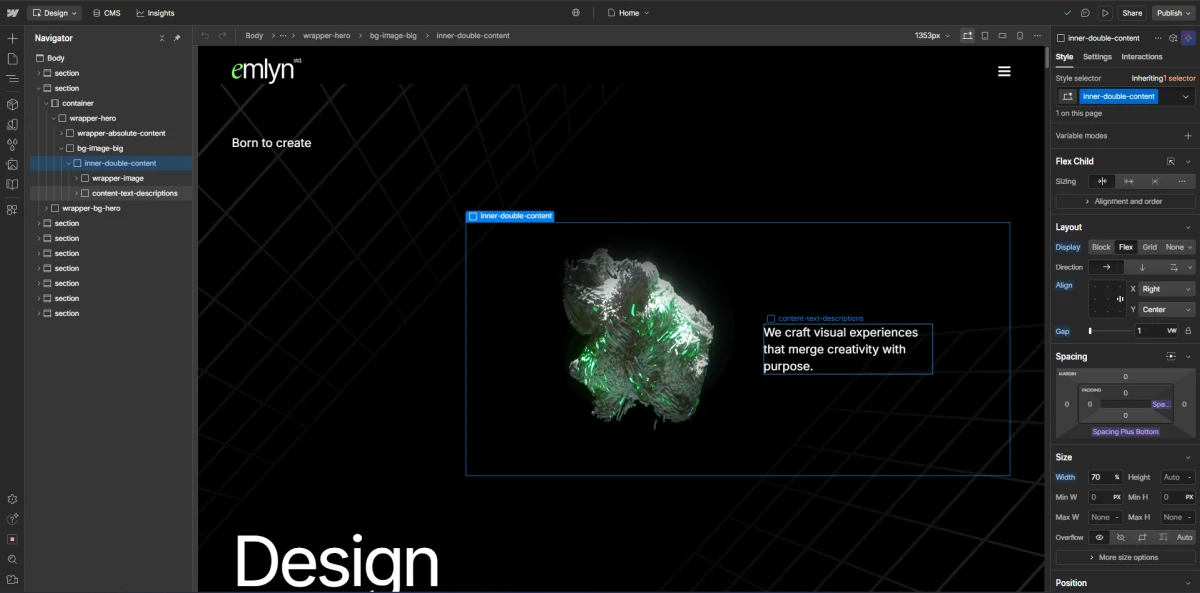
If you want to modify the hero image and text content, you can do so by entering the "wrapper-hero" and then following the instructions shown in the image below.
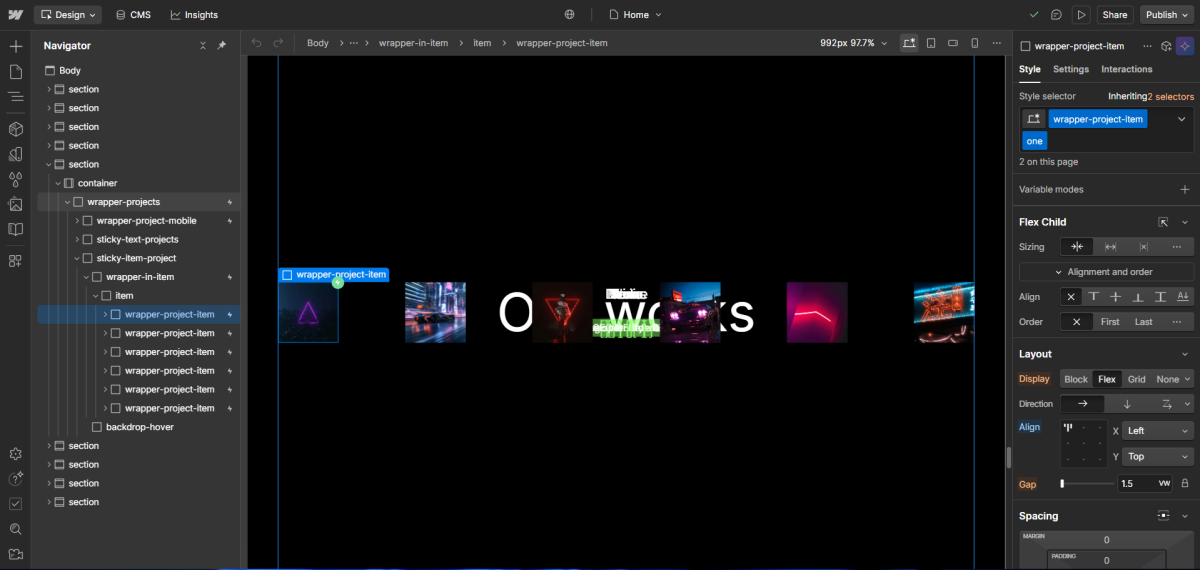
And if you want to edit the project item section, you need to refer to the image below.